


To Run the SFC /SCANNOW Command in Windows 7
1. Open an elevated command prompt.
2. To Scan and Repair System Files
NOTE: Scans the integrity of all protected system files and repairs the system files if needed.
A) In the elevated command prompt, type sfc /scannow and press Enter. (see screenshot below)
NOTE: This may take some time to finish.
Enlarge this image 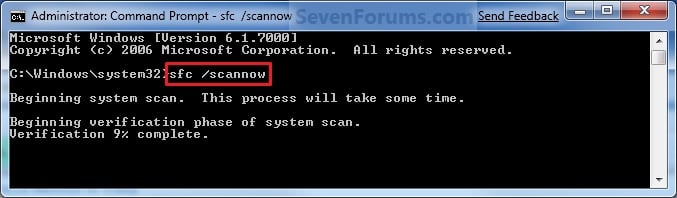
B) Go to step 4.
3. To Only Verify if the System Files are Corrupted
NOTE: Scans and only verifies the integrity of all proteced system files only.
A) In the elevated command prompt, type sfc /verifyonly and press Enter.
4. When the scan is complete, hopefully you will see all is ok like the screenshot below.
NOTE: If not, then you can attempt to run a System Restore
using a restore point dated before the bad file occured to fix it. You
may need to repeat doing a System Restore until you find a older restore
point that may work.
Enlarge this image 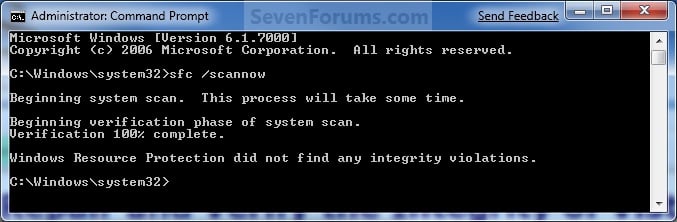
5. When done, close the elevated command prompt.
skip to main |
skip to sidebar


သီခ်င္းေတာင္းခ်င္ပါက dj@mmyos.com ကိုအပ္၍ ေတာင္းဆိုႏို္င္ပါသည္
သင္တန္းသစ္ေၾကာ္ျငာ
Ko Aye kyaw ( M.C.Sc [UCSS] ). Powered by Blogger.

Get the Flash Player to see this player.
Shoutcast & Icecast Server
သီခ်င္းေတာင္းခ်င္ပါက dj@mmyos.com ကိုအပ္၍ ေတာင္းဆိုႏို္င္ပါသည္
Visitors
Copyright © 2011 MCC Sittway Computer Training Centre | Powered by Ko Aye Kyaw (M.C.Sc)
Design by Free WordPress Themes | Bloggerized by Lasantha - Premium Blogger Themes | LunarPages Coupon
0 comments:
Post a Comment
MCC Sittway Computer Training Centre
လာေရာက္အားေပးမႈကို ေက်းဇူးအမ်ားၾကီး
တင္ပါတယ္.... ေနာက္လည္း အားရင္
လာခဲ့ပါဦး...........